Google AI Mode is an AI-powered search experience inside Google. When you ask a question, it generates an AI-written answer with sources. Traditional search results used to show 10 website links. After it generates the initial answer, you can then ask follow-up questions, just like a chat.
AI Mode isn’t the same as Gemini or AI Overviews, although all three use Google’s Gemini AI models. In this guide, we’ll discuss its AI Mode, how it works, how it compares with Gemini and AI Overviews, and how to get your business cited in it.
What Is Google AI Mode?
Google describes the AI Mode as its most powerful AI search experience. The tool is perfect for follow-up questions, allowing users to get all the necessary information before making a confident decision. Some powerful use cases can include:
- Exploring a new topic
- Comparing options
- Planning something
Let’s say you search “Best places to visit in the Lake District in winter, with cat-friendly cafes.” The regular search results would have a list of pages to select from. AI Mode reads several sources and creates an answer that covers your question from different angles, and it gives you the links to dive deeper. It’s probably the main reason why AI Mode is growing so fast; in its Q2 2026 earnings update, Alphabet said AI Mode had passed 1 billion monthly active users.
How Do You Use AI Mode in the UK?
Google has already launched AI Mode in the UK in 2025. You can use it by asking a follow-up question after a search query triggers an AI Overview. This will take you to an AI Mode experience.
How Does Google AI Mode Work?
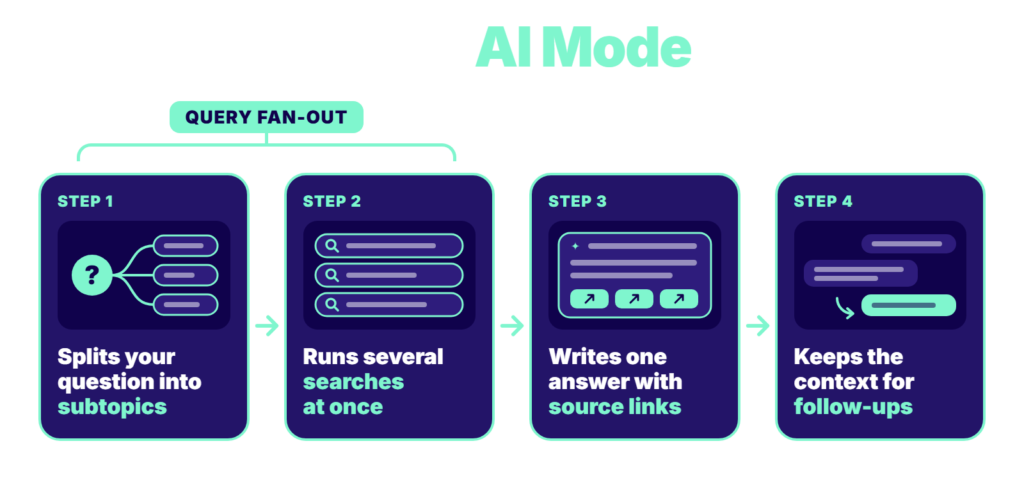
AI Mode uses query fan-out; it’s a technique Google uses for it.
- It splits the main question into smaller parts: Breaks down a complex question into several subtopics.
- It runs several searches at once: AI Mode runs a range of queries at once on your behalf for those subtopics. This lets the user dig deeper into the web as compared to a single search.
- It then writes one combined answer: AI Mode pulls the information together into a single answer. This answer also contains links to the sources/pages it used.
- It remembers the conversation: Just like in an AI chatbot like ChatGPT or Gemini, AI Mode keeps the context of what you sent it previously, so you can ask follow-up questions.
What Is the Difference Between Google AI Mode and Gemini?
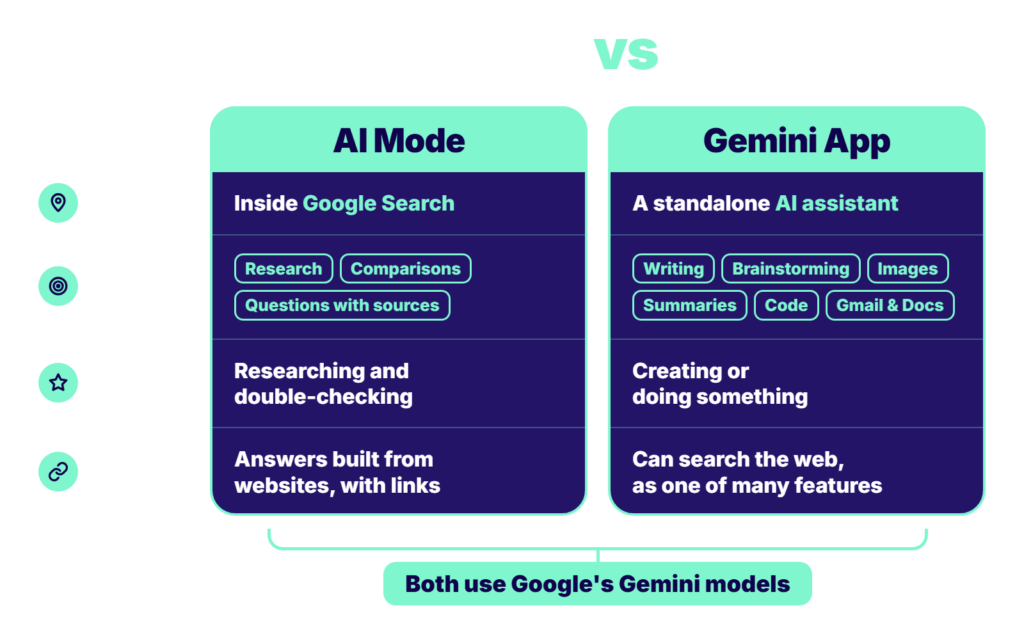
Both use Google’s Gemini models, but the main difference is user experience. AI Mode lets you dive deeper into a topic on Google’s search engine, whereas Gemini is an AI assistant.
Google AI Mode lives inside Google Search. It finds information across the web and gives you an answer based on what it finds on websites. Ideal use cases include research, comparisons, and questions where you want sources.
Google Gemini app is a standalone AI assistant. You can use it for a variety of things, such as writing marketing content, brainstorming ideas, creating images, summarising documents, writing code, and working with Google apps like Gmail and Docs. It can search the web too, but that’s one of the many things it offers.
Here’s an example: If you want to research a question and double-check the information on other websites, AI Mode might be a better fit. If you want help creating or doing something, Gemini can usually assist better. The Gemini app has a huge audience on its own, with more than 1 billion monthly active users worldwide.
What Is the Difference Between AI Mode and AI Overviews?
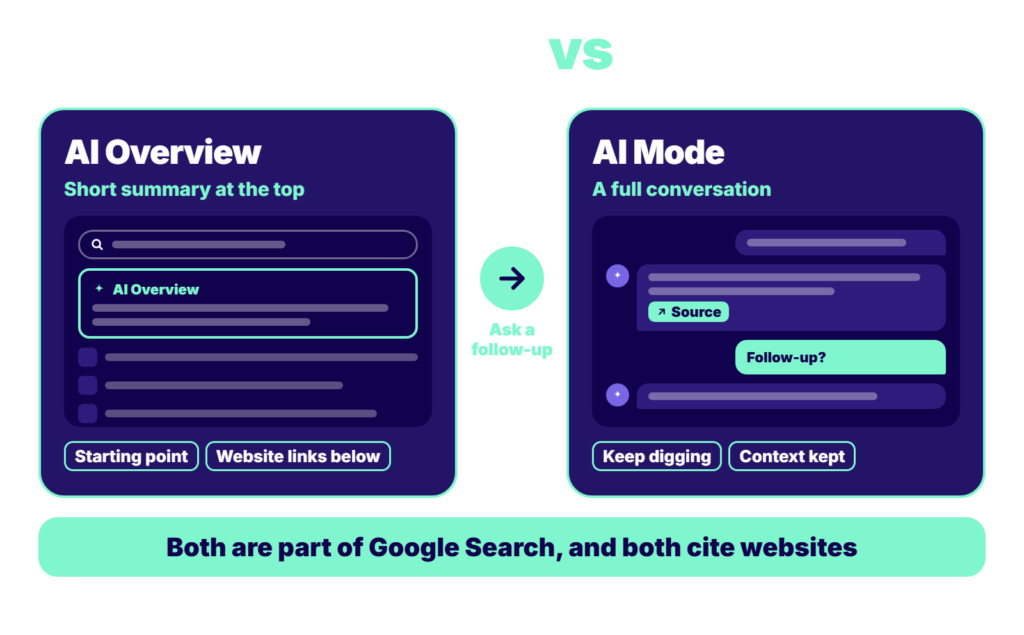
AI Overviews and AI Mode are both parts of Google Search, but they work at different depths.
- AI Overviews are AI summaries at the top of the search results page for some queries. When a search triggers an AI Overview, you still see a list of website links beneath it. Gemini 3 is the default model Google uses in AI Overviews.
- AI Mode, on the other hand, offers a chat-style experience. If you don’t want to open a link just yet, you can ask AI Mode more questions to dive deeper into the topic. The experience you get in AI Mode is similar to what you get in the Gemini app.
In practice, an AI Overview acts as the starting point, and AI Mode takes over when a user wants to keep digging. Google AI Overviews also cite links to websites. If you want to learn how to get your website cited, read our guide on how to appear in Google AI Overviews.
Why Does AI Mode Matter for Your Business?
This is mainly because people using AI Mode rarely leave Google. A Semrush study of almost 69 million Google search sessions found that only 6 – 8% of AI Mode sessions led to a visit to a website. This means more than 90% of those sessions were zero-click.
It also found that AI Mode queries were almost twice as long as traditional searches. This means AI Mode receives more detailed, long-tail queries than normal Google search.
How Can You Show Up in Google AI Mode?
According to Google, to show up in Google AI Mode, all you need is indexation and eligibility to show in Search with a snippet. There’s no additional requirement. Having said that, a few strategies can make your pages more “Visible”.
Get Your Technical SEO Basics Right: Make sure your website is crawlable, indexable, and isn’t blocked from showing snippets.
Give Direct Answers: If a section demands an answer, offer a clear and direct answer upfront. Go into the details later. Try to use question-style headings.
Cover Follow-Up Questions: Because of query fan-out, AI Mode searches for related subtopics. When your page answers obvious follow-up questions in addition to the main question, it is more likely to be pulled in by AI.
Build Your Brand’s Trust: A well-built website is crucial for growth, but to build your brand, try to get mentions on reliable industry sites and keep your business information consistent. It can help AI tools recognise and cite your brand.
How Can AI SEO Help You With Google AI Mode?
Google’s AI Mode is changing how people interact with Google. Getting cited by AI Mode takes more than it did in the past. Build a solid SEO foundation; that’s a no-brainer. Plus, write answer-first content on your site.
AI SEO helps business owners with virtually every part of AI visibility, so you stay visible across Google’s AI features, ChatGPT, and other AI tools.